SQL Many-To-Many Relationship between a Table and a View
Many-to-Many Relationships
A many-to-many relationship in SQL occurs when multiple records in one table are associated with multiple records in another table. To implement this, you typically use another table that connects the two.
This table is known by a few different names :
- Junction table
- Bridge table
- Linking table
- Associative table
- Mapping table
Technical Requirements
-
Two database tables acting with a parent child relationship, enforced with a FOREIGN KEY relationship.
-
A table in another database on the same SQL Server, which needs to act as the grandparent in the above relationship.
-
A grandparent can be assigned to many parents.
-
A parent can have many grandparents.
Solution
Data in the parent and child tables is currently maintained using one of my Reference Data Web Apps
These apps are configured by me to be per database, so that I have only one connection string in the settings file, to keep things clean and simple.
So to maintain this, I create a SQL VIEW to SELECT the records from the other database, and treat this as just another “table”/POCO in the dotnet web app.
;CREATE VIEW JobTypes AS
SELECT [JobTypeID], [Description] FROM OTHER_DB.dbo.JobTypes WHERE [Enabled] = 1
The scaffolded entity for the grandparent VIEW resulted in a null reference exception when accessing the parent.
        modelBuilder.Entity<JobType>(entity =>
        {
            entity
                .HasNoKey()
                .ToView("JobTypes");
            entity.Property(e => e.Description)
                .HasMaxLength(50)
                .IsUnicode(false);
            entity.Property(e => e.JobTypeID).ValueGeneratedOnAdd();
        });
Simplifying it to the below resolved the error :
modelBuilder.Entity<JobType>();I declared the linking table as so:
CREATE TABLE dbo.FaultJobTypes (
    FaultsFaultID INT NOT NULL,
    JobTypesJobTypeID INT NOT NULL,
    PRIMARY KEY (FaultsFaultID, JobTypesJobTypeID),
    FOREIGN KEY (FaultsFaultID) REFERENCES Faults(FaultID)
	--,FOREIGN KEY (JobTypeID) REFERENCES JobTypes(JobTypeID) ** Not Possible, because FK to VIEW not allowed
);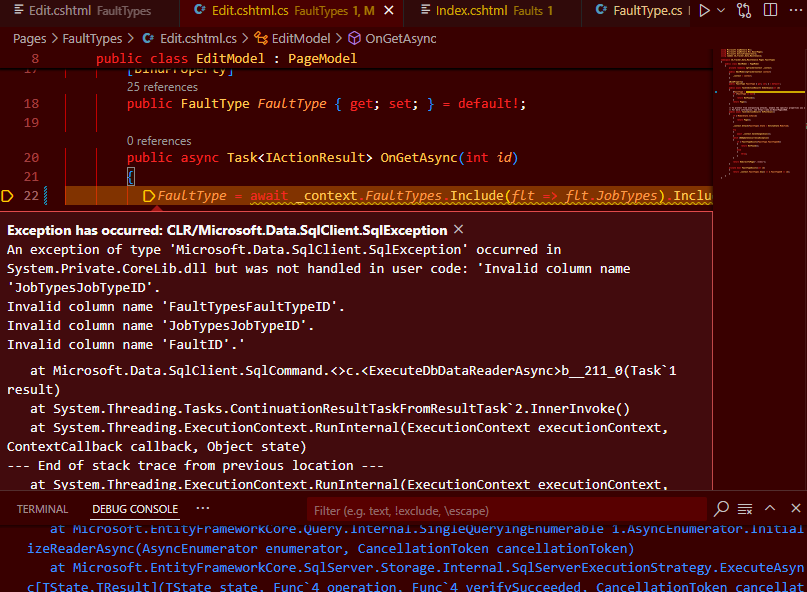
EF Core letting you know what to call the column names
And configure it within the EF model builder:
|
|
I am well impressed with how EF Core handled this scenario.
Related Posts
2023-11-23
2021-04-22